

Policies
Policies lets you configure DeepSource for your team, from a single place.
AI & Agents Policy
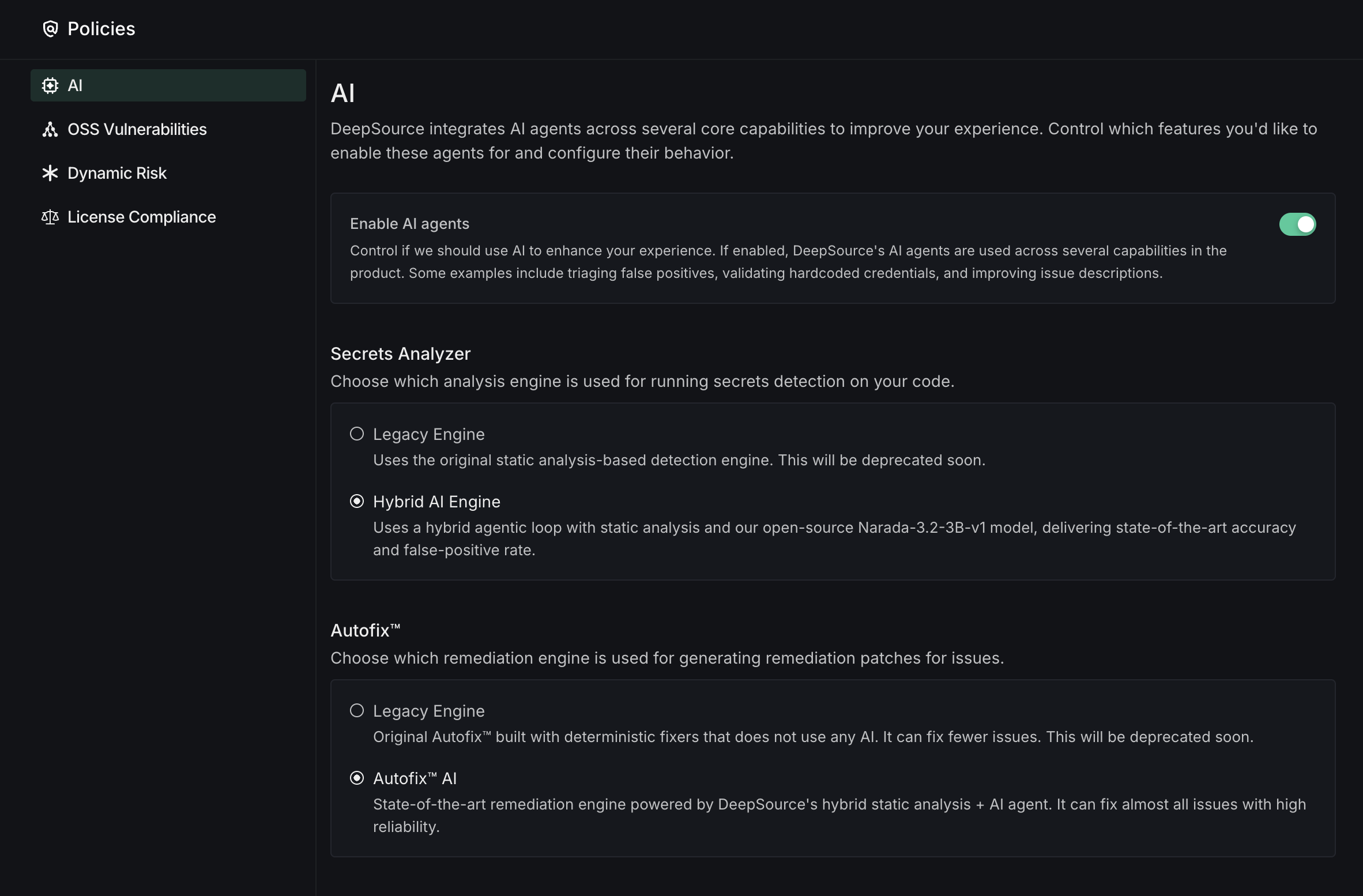
DeepSource uses AI agents across several core product capabilities. Control which features you'd like to enable these agents for and configure their behavior. These settings apply to all repositories in your team.
-
Enable AI Agents: Master toggle to enable or disable all AI-powered features globally. When enabled, DeepSource's AI agents are used across several capabilities in the product, such as AI Review, enhanced secrets detection, PR Report card, and Autofix™. When disabled, all AI settings below cannot be modified.
-
AI Review: Control when AI Review runs on your pull requests.
- Always run AI Review: AI Review will automatically run on all commits and pull requests alongside static analysis checks.
- Run AI Review only on mentions: AI Review will run only when
@deepsourcebotis mentioned in PR comments. Static analysis checks will run by default, and results will be augmented when AI Review finishes running. (Recommended)
Running AI Review on mentions is recommended for most teams. It gives you control over when AI Review runs, helping optimize AI credit usage while still getting the full benefit of AI-powered reviews when you need them.
- Enforce AI Review on pull requests: Posts a commit status named
DeepSource: AI Reviewon every pull request, in repositories that have commit status reporting enabled. The status stays pending until AI Review runs on the pull request's latest commit, and passes once the review completes. If a review can't complete, the status fails until you re-run it. To block merging until then, mark the status as a required check in your repository's branch protection rules. This setting is off by default, and is not available on Bitbucket Cloud.
For monorepo sub-repositories, the sub-repo path is appended to the status name — e.g.
DeepSource: AI Review (backend). Mark each sub-repository's status as required, not the bare name, or the required check will never be reported.With Run AI Review only on mentions, the enforcement status stays pending until someone mentions
@deepsourceboton the pull request. Enable enforcement only if every pull request in your team should go through AI Review before merging. -
Autofix™: Remediation engine used for fixing code quality and security issues.
- Legacy Engine: Original Autofix™ built with deterministic fixers that do not use any AI. It can fix fewer issues. This will be deprecated soon.
- Autofix™ AI: State-of-the-art remediation engine powered by DeepSource's hybrid static analysis + AI agent. It can fix almost all issues with high reliability. (Recommended)
- Show Autofix™ suggestions in PR comments: Include inline fix suggestions alongside review comments on pull requests. This adds to the total review time, and it will take longer for reviews to show up.
-
Secrets Analyzer: Analysis engine used for detecting hard-coded credentials in committed source code. Choose the detection engine for the Secrets Analyzer:
- Legacy Engine: Uses the original static analysis-based detection engine. This will be deprecated soon.
- Hybrid AI Engine: Uses a hybrid agentic loop with static analysis and our open-source Narada-3.2-3B-v1 model, delivering state-of-the-art accuracy and false-positive rate. (Recommended)
OSS Vulnerabilities
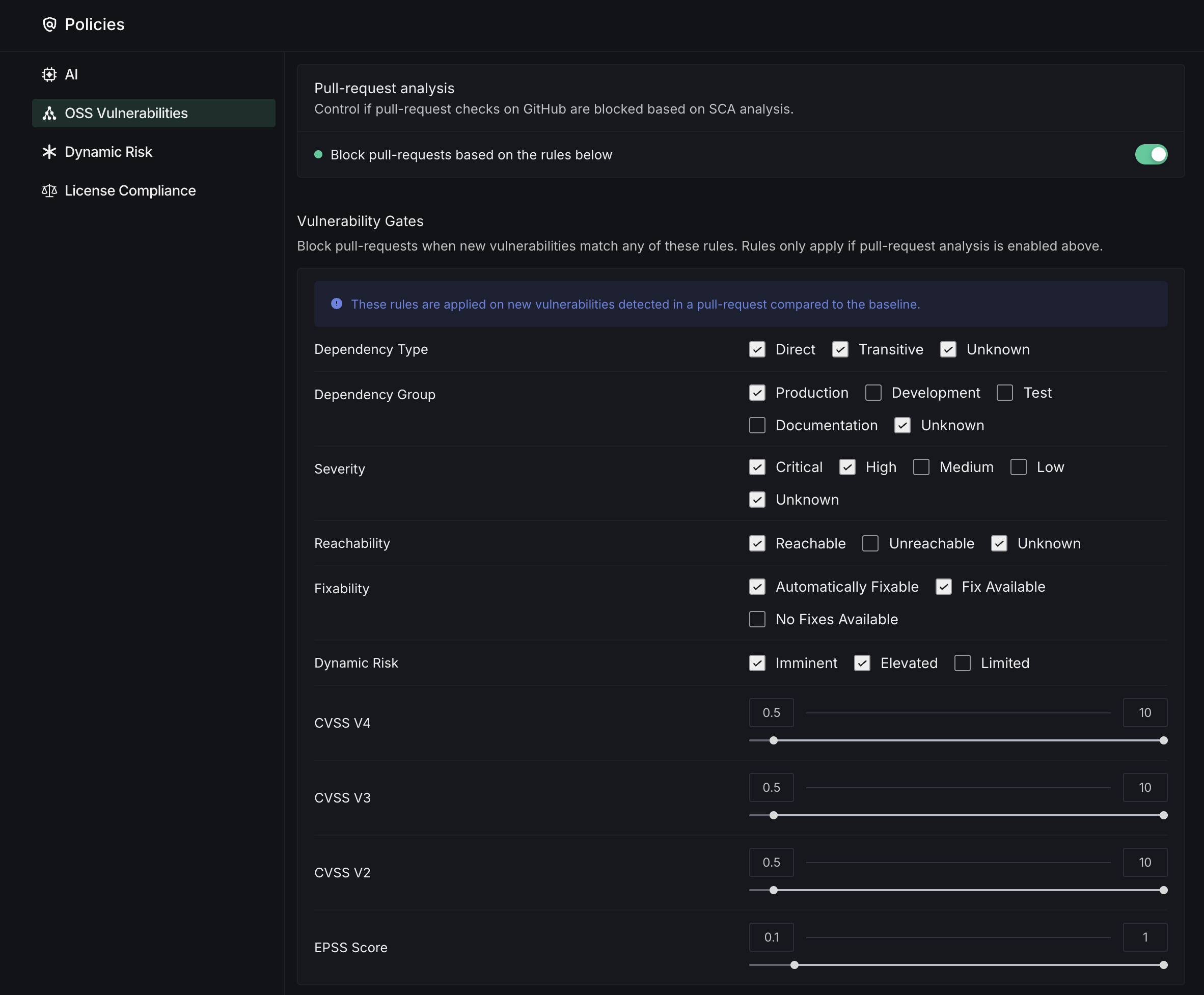
The Pull-request analysis section lets you configure how vulnerability findings affect your GitHub workflows.
- Block Pull-Requests: Toggle to enable automatic blocking of pull requests based on configured vulnerability rules
- Dependency Filtering: Select which dependencies to monitor by type (Direct, Transitive), environment (Production, Development, Test), and documentation
- Severity Controls: Choose which severity levels (Critical, High, Medium, Low) will trigger blocking
- Reachability Options: Filter vulnerabilities based on whether they're directly accessible in your code
- Fixability Settings: Control blocking based on whether automated fixes are available for detected issues
- CVSS Score Thresholds: Set minimum score requirements for different CVSS versions (V2, V3, V4) and EPSS using sliding scales
New Vulnerability Alerts
DeepSource automatically monitors vulnerability databases and re-scans your activated targets when new or updated vulnerabilities are published. This keeps your vulnerability dashboard updated even when your code hasn't changed.
When a newly published vulnerability affects a package in your project, DeepSource:
- Identifies affected targets on your repository's default branch
- Triggers a re-analysis to determine if your specific package versions are affected
- Updates the vulnerabilities listed in the Dependencies dashboard
- Sends email notifications based on your configured severity threshold
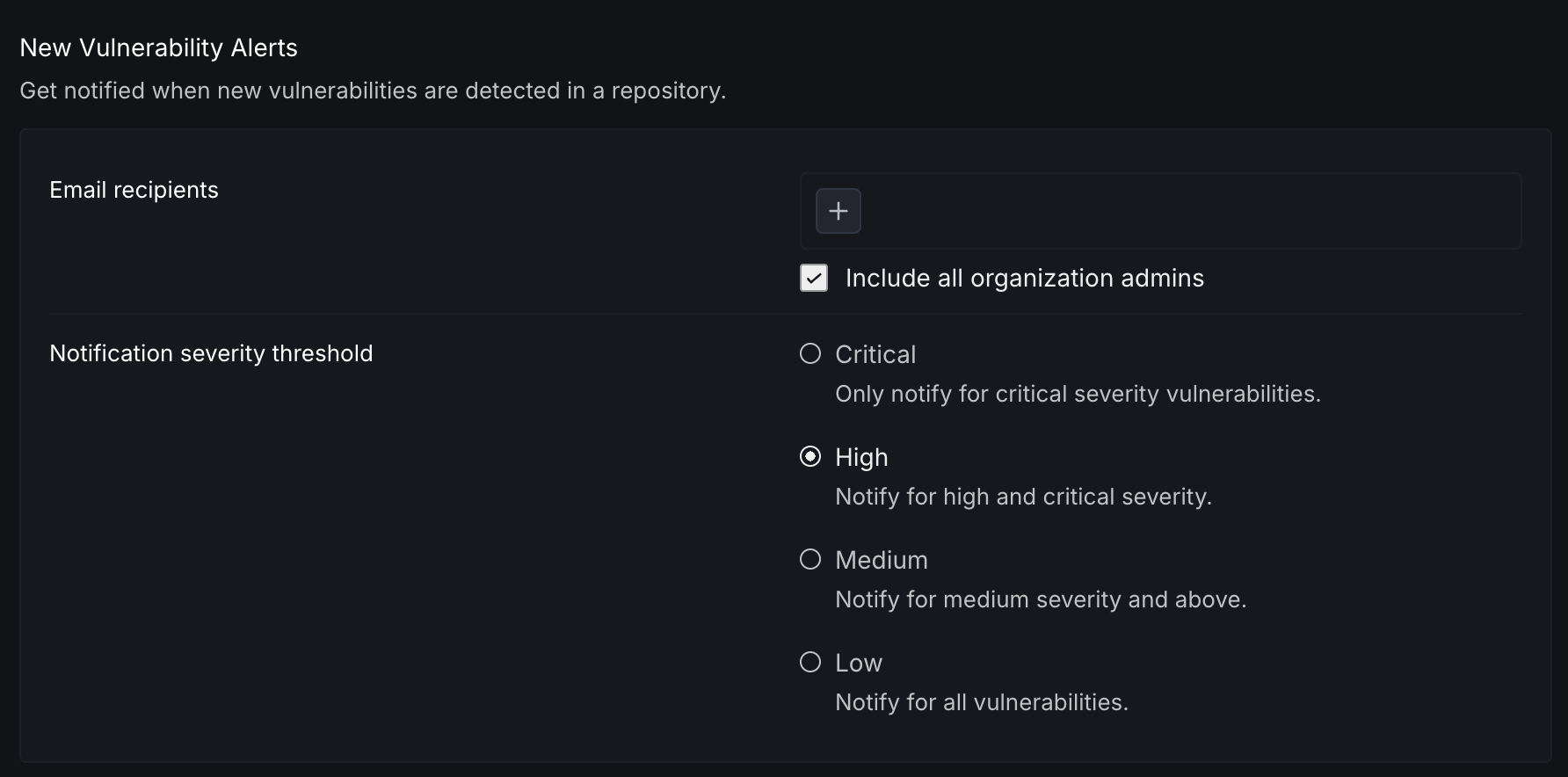
Configure who gets notified and for which severity levels:
- Email recipients: Add individual email addresses to receive vulnerability alerts
- Include all organization admins: When enabled, all organization admins automatically receive alerts
- Notification severity threshold: Control the minimum severity level that triggers notifications.
- Critical: Only notify for critical severity vulnerabilities
- High: Notify for high and critical severity
- Medium: Notify for medium severity and above
- Low: Notify for all vulnerabilities
Only activated targets are included in periodic scanning. You can activate or deactivate targets from the Settings section of each dependency target.
Dynamic Risk
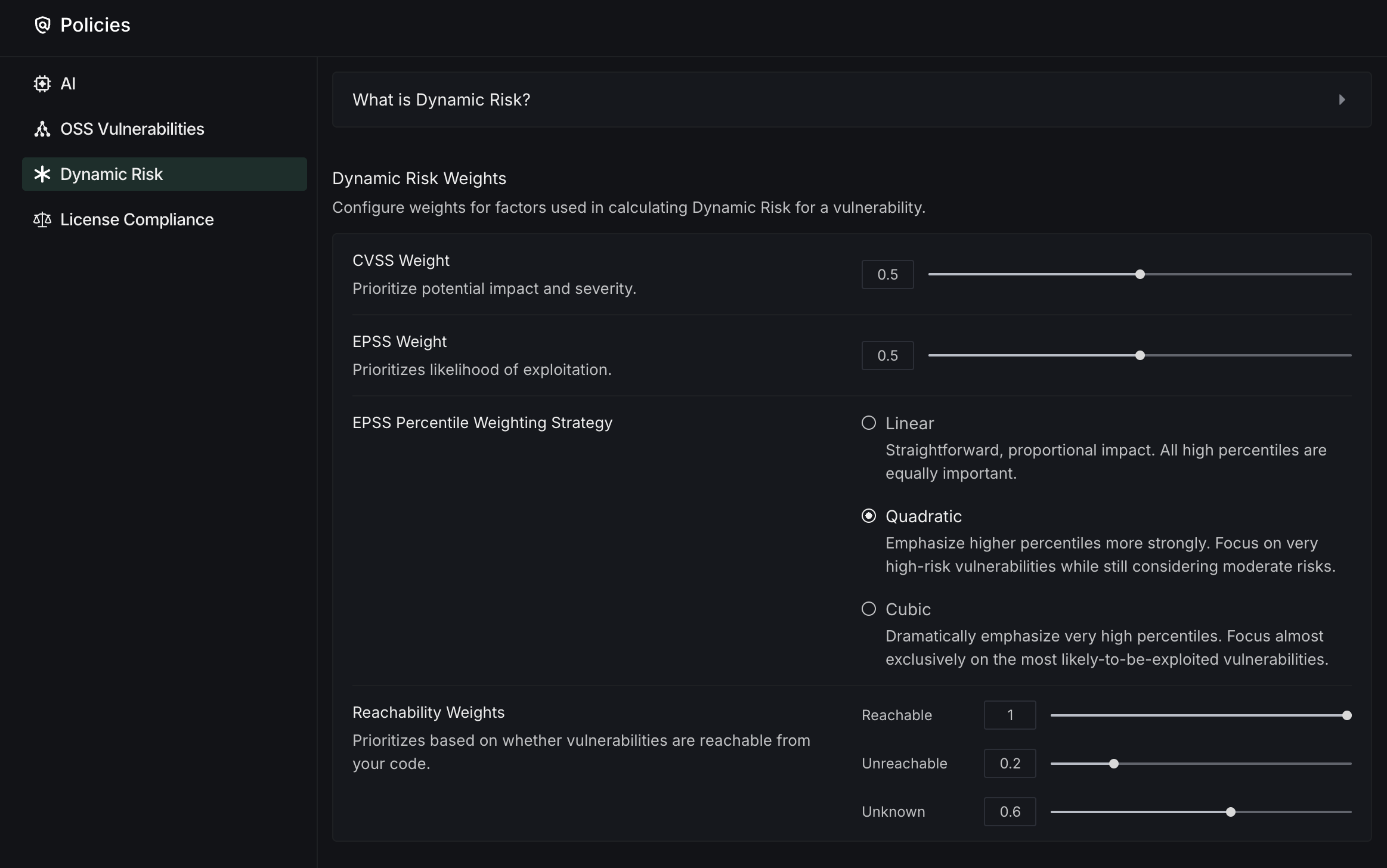
Dynamic Risk is DeepSource's custom vulnerability metric that combines CVSS, EPSS, and reachability analysis into a single, actionable score. This comprehensive assessment helps security teams prioritize vulnerabilities based on real-world impact and allocate resources more effectively. Configure how DeepSource prioritizes vulnerabilities based on multiple risk factors.
- Risk Weighting System: Adjust weights for factors used in calculating Dynamic Risk scores:
- CVSS Weight: Prioritize based on vulnerability impact and severity
- EPSS Weight: Prioritize based on exploitation likelihood
- Reachability Weights: Assign importance to whether vulnerabilities are accessible from your code
- Weighting Strategy: Choose how EPSS percentiles are calculated:
- Linear: Equal importance to all high percentiles
- Quadratic: Greater emphasis on very high-risk vulnerabilities
- Cubic: Almost exclusive focus on the most likely-to-be-exploited vulnerabilities
License Compliance
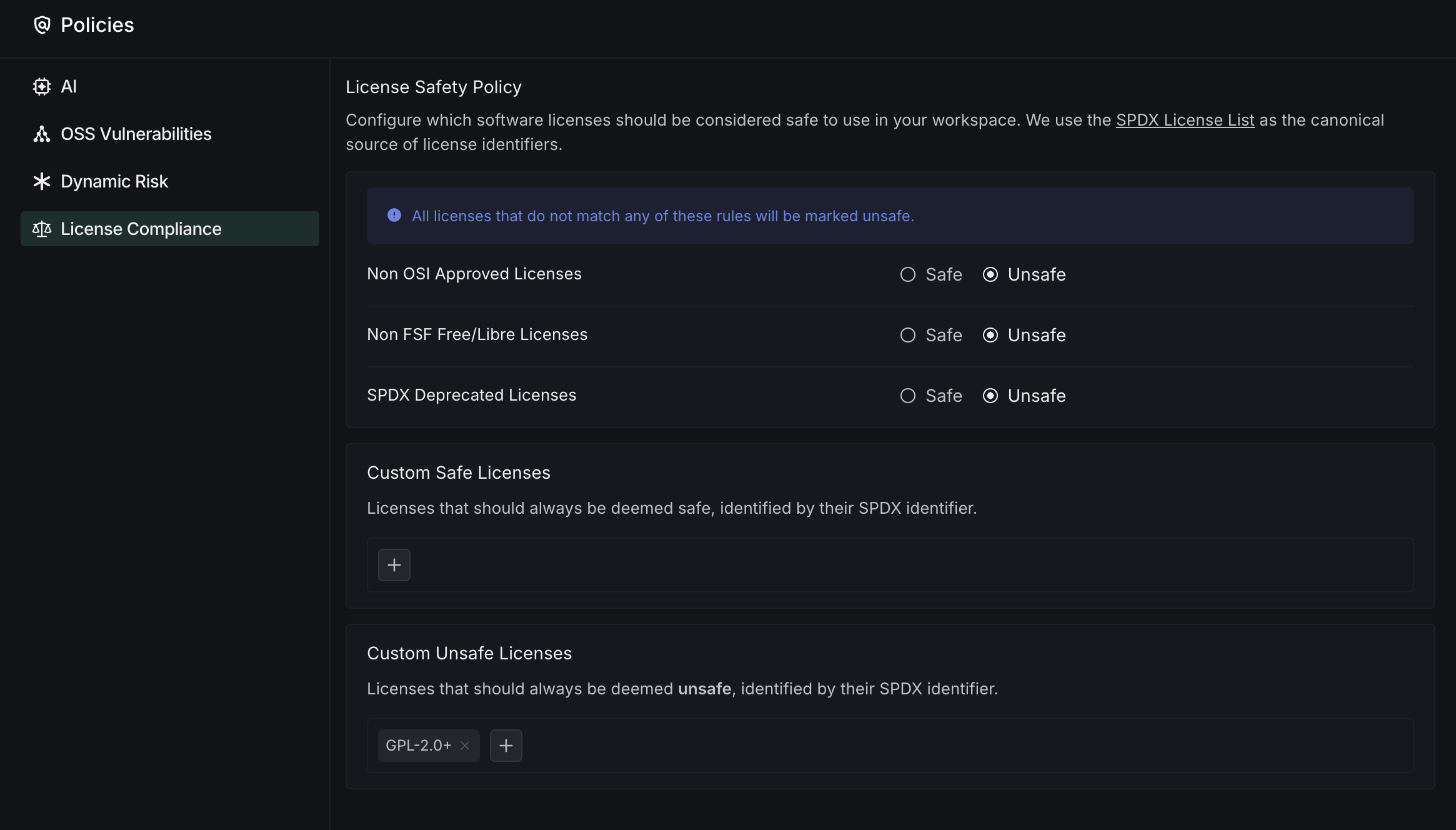
The License Compliance section lets you configure which software licenses are considered safe to use in your team. This helps your team maintain compliance with organizational license policies and reduces legal risks.
- License Safety Policy: Define which categories of licenses are acceptable for your team
- SPDX License List: DeepSource uses the SPDX License List as the canonical source for license identifiers
- License Category Rules: Set policies for different license categories:
- Non OSI Approved Licenses: Mark licenses not approved by the Open Source Initiative as safe or unsafe
- Non FSF Free/Libre Licenses: Control usage of licenses not recognized by the Free Software Foundation
- SPDX Deprecated Licenses: Manage the use of licenses that have been deprecated in the SPDX standard
- Custom License Lists: Create and manage custom rules for specific licenses
- Custom Safe Licenses: Add specific SPDX identifiers that should always be deemed safe
- Custom Unsafe Licenses: Add specific SPDX identifiers that should always be deemed unsafe
This configuration helps your team avoid introducing dependencies with licenses that don't align with your organization's legal requirements or open source policies.